ArcTree
ArcTree™ is a plugin for IntelliJ IDEA™ that visualizes the dependency structure of your project. It shows the classes and methods related to the code you are working on, helping you navigate large codebases and quickly identify undesirable dependencies. Currently, we support projects written in Java and Kotlin.
If you prefer video to text, watch our tutorial video on YouTube.
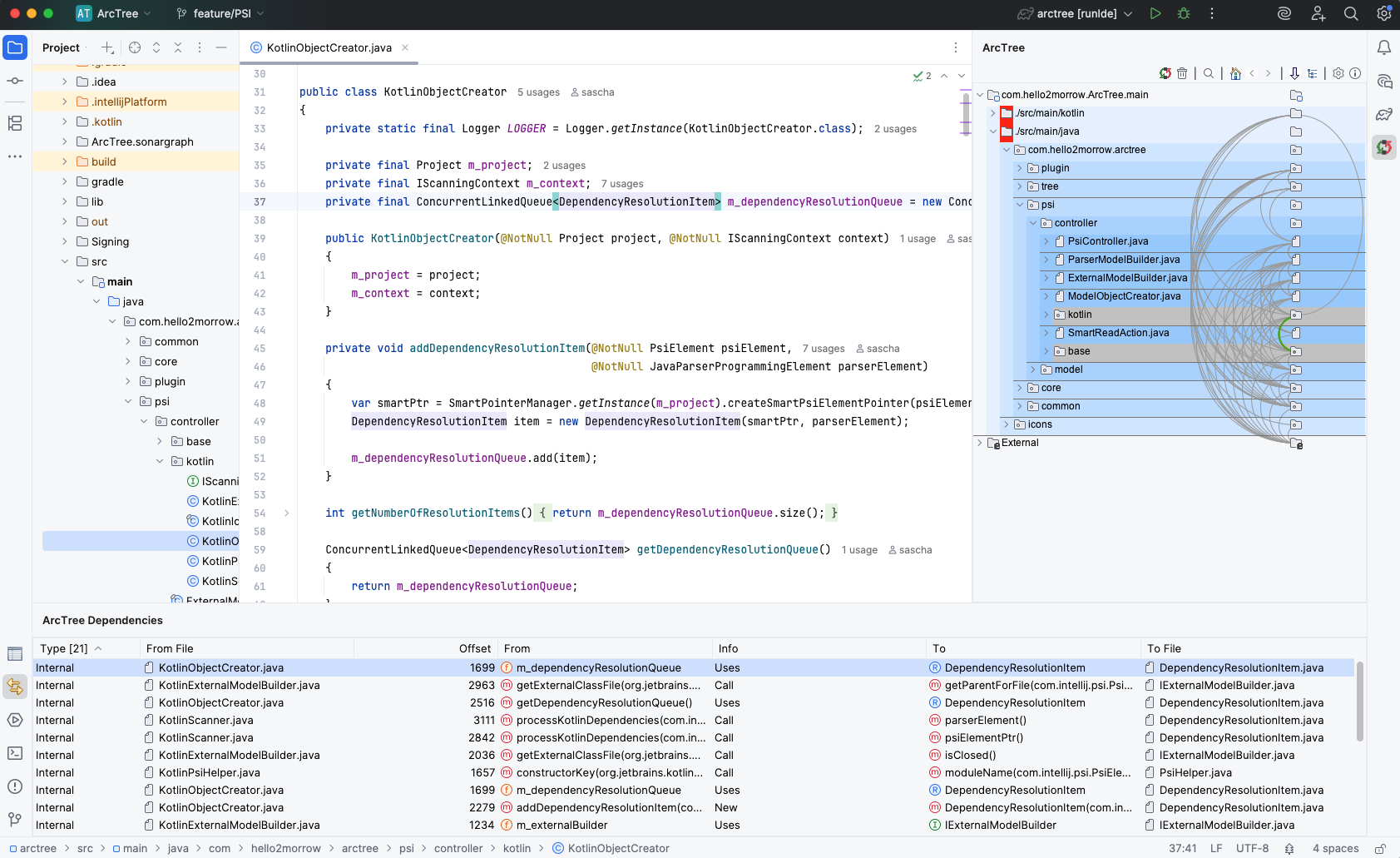
How to read the tree
The project is displayed as a tree, much like the navigation view of your IDE. Dependencies are represented as counterclockwise-directed arcs, and arc thickness indicates the number of dependencies between two nodes.
- ArcTree's magic lies in its graph layout algorithm, which minimizes upward dependencies: if some node 'A' is using another node 'B', then 'B' is located under 'A'.
- If 'B' is also using 'A' at the same time, the order is determined by the relative weight of the dependencies in both directions. If 'A' has more dependencies on 'B', then 'B' still sits under 'A'.
- In that case both 'A' and 'B' are marked with a red background because they form a cyclic dependency. That makes cyclic dependencies easy to spot.
- Selecting an arc lists the dependencies forming that connection in the dependencies window at the bottom. Double-clicking any of them jumps directly to the code location that introduces the dependency.
Why it matters
Visibility into structure
ArcTree solves one of the biggest issues for developers working on complex codebases: the lack of visibility when it comes to code structure and architecture. Without it, developers introduce undesirable dependencies without noticing the problem.
Fix problems while they are cheap
Every developer can immediately spot problematic dependencies and fix them while they are still easy and inexpensive to fix. That leads to codebases that are easier to maintain, easier to test and easier to comprehend.
Verify what your AI assistant proposes
When working with coding assistants like Claude Code or ChatGPT, ArcTree helps you verify proposed changes. If a change introduces dependencies that violate the design of your system, you can give the assistant feedback to avoid them.
Focus on what is relevant
ArcTree also comes with a powerful focus concept that allows you to limit the visualization to just the parts of the system that are currently relevant to you.
Get started
Try ArcTree for free for two weeks: install it from the JetBrains Marketplace and work through the tutorial so that you can properly assess all the features. If you want to keep using ArcTree after the evaluation period, please consider buying an annual subscription. And if you want to go the extra mile to improve the visibility of ArcTree, rate it on the JetBrains Marketplace.
To buy an ArcTree subscription you need an account on this website. We recommend creating one once you have seen the benefits of ArcTree.